Global Class creation and visibility of the class component-->Attributes
Steps
- Go to transaction code SE24.

- Initial screen of Class Builder looks like this.

- Enter the Object Type (class name ) , start's with YCL_ or ZCL_ <class name > and click on create button.

- Enter the short description and click on SAVE button.

- Save it in either Package or Local Package.

- Class Interface looks like this.

- Click on attributes Tab,

- Enter the attribute name.

- Click on Level and press F4 help.

- Select the Level ( instance ) of the attribute.

- Click on Visibility and press F4 help.

- Select the Visibility of the attribute.

- Enter the Associated type( data type ).

- Enter the Description.

- Enter the initial Value ( optional ) .

- Note : N1 is known as Instance Public attribute .
- To Add static public attribute follow following steps.
- Enter attribute name.

- Click on Level and press F4 help.

- Select static attribute.

- Click on Visibility and press F4 help.

- Select the visibility.

- Enter the Associated Type .

- Enter the description.
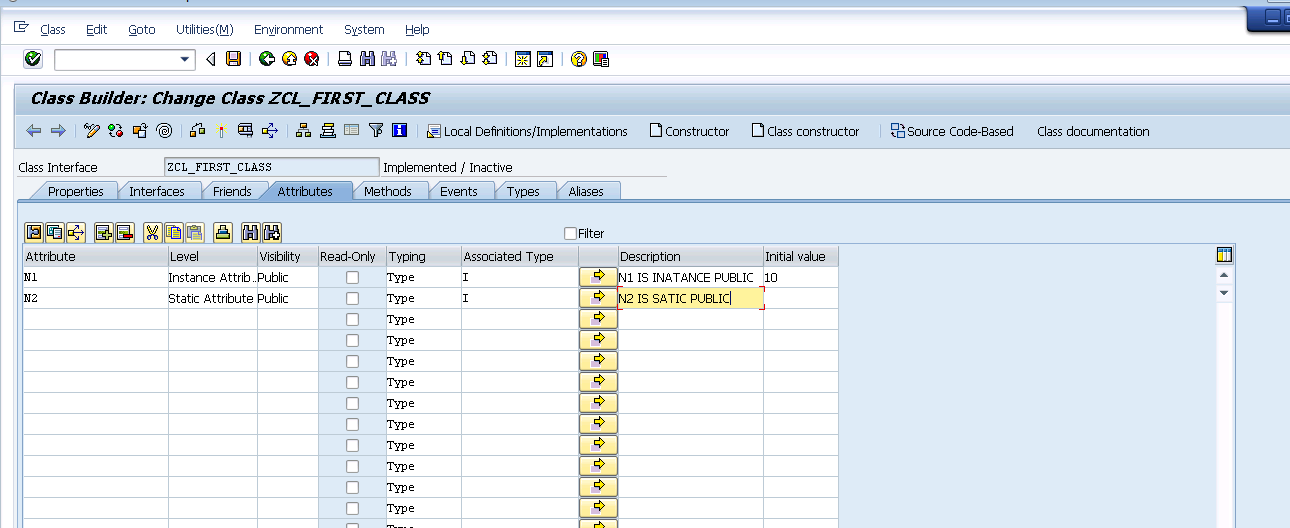
- Enter the initial value.

- Similarly create different attributes as shown below as per Level and Visibility.

- Note :
- N3 is known as instance protected.
- N4 is known as static protected.
- N5 is known as instance private.
- N6 is known as static private.
- Save -> Check -> Activate.

Usage of Global Class.
- Go to transaction code SE38.

- Enter the program name start's with Y or Z<program name > and click on create button.

- Enter the Title , select attribute type as executable program and click on Save .

- To declare the object.
DATA : <object name > Type <Class name >.
- Ex : obj type ZCL_FIRST_CLASS.

- To create the object.
CREATE OBJECT < object name> .
- Ex : Create object OBJ.

- We can call instance attributes using ,
<object name >-><attribute name>.
- We can call static attribute using,
<object name >-><attribute name>.
or
<Class name >=><attribute name>.
- Save -> Check->Activate.

- Execute.


Comments
Post a Comment